
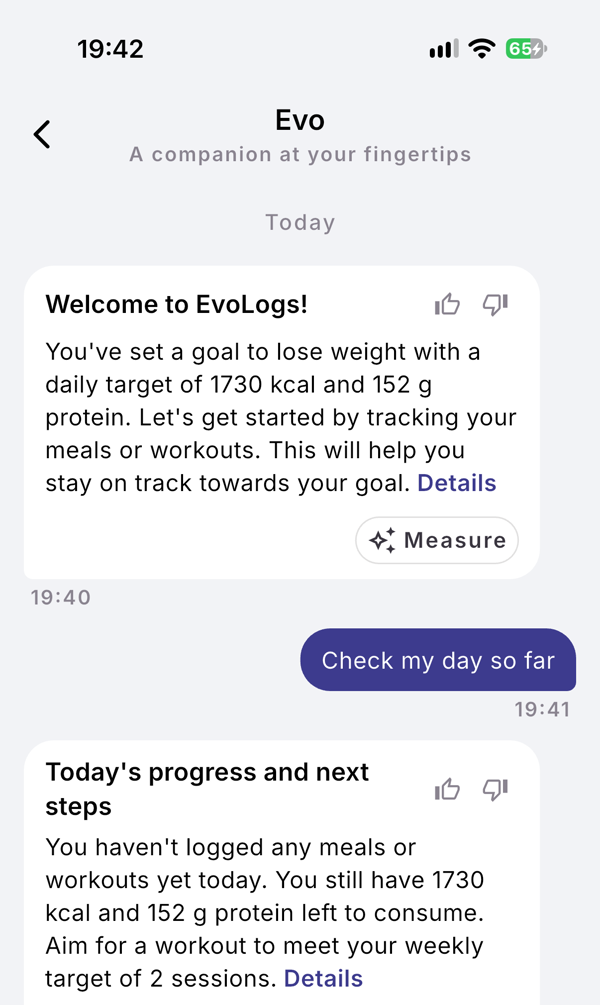
The card titled Evo on Home shows the latest message Evo wrote and when it wrote it. Tap the card to open the thread, one conversation grouped by day that keeps every message.
Steps
- Open Home and find the card titled Evo, “A companion at your fingertips”.
- Read the message and the date or time at the top right of the card.
- Tap the card to open the thread at that message.
- Scroll up to read older days, which load as you go.
- Tap Details at the end of a message to read the longer explanation, when there is one.
- Tap the thumbs up or the thumbs down next to a message’s title to say whether it helped.
What you see
- Before your first logs. The card says “Evo will speak after your first logs.” If you can type to Evo, it shows three starter questions instead.
- Chips. A message can carry one action chip, such as Measure, or up to three answer chips. Tapping an answer chip on the card opens the thread.
- Days. The thread is split by “Today”, “Yesterday” and then the date.
- Day checks. Answers to a day check are marked “Day check ·” and the time.
If it does not work
- “Thinking…” under your message means Evo is still answering.
- “Evo couldn’t answer that. Try again.” The answer failed; send the message again.
- No text field at the bottom of the thread: you cannot type to Evo right now. You can still read everything and tap answer chips.
Related
- What Evo is and when it speaks: /blog/meet-evo
- /help/check-your-day
- /help/evo-actions