
Most tracking apps count. You log a meal, you get a number. You log a workout, you get a longer list. EvoLogs counts too, but that is not what it is for. It is built around Evo, a companion that reads everything you log, food, training, sleep, mood, measurements, and talks to you about it. Not every hour. When something changed.
This article is what Evo does today, in the app you can install. Nothing more.
Where you meet it
Evo lives on the home screen, in one card. The card shows the latest thing Evo said and when it said it. Before your first logs it says only: “Evo will speak after your first logs.”
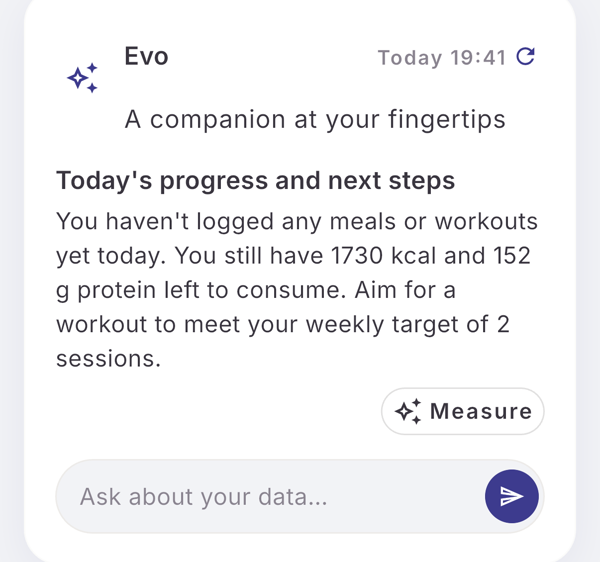
Tap the card and you are in the thread: one conversation, grouped by day, that keeps everything Evo ever told you. Every message has a thumbs up and a thumbs down. Use them. They are read.
When Evo speaks
Evo does not post a daily motivational line. It speaks when something in your data changed. Today those moments are:
- you set or change your goal, including the first time, right after onboarding
- a new measurement comes in, weight, waist, photos
- your calorie or macro targets change
- you connect or disconnect Apple Health or Health Connect
- you finish or skip a workout plan
- you come back after days away
- a weigh-in is overdue, or your weight has been flat for a while
- Evo said it would follow up on something, and that day arrived
A day with nothing logged gets no comment about that day. There is no streak to protect.
Each message is two to four sentences and can carry one action: measure now, adjust the targets, connect Health, log a meal, add the exercise, start the plan, or come back to this later. Actions are suggestions. You confirm them, and an action Evo proposed expires after seven days if you do not.
Checking your day
On the card there is a small refresh icon next to the date. Tap it and Evo checks your day so far: what you logged, what is left against your targets, what would make sense next. The answer replaces the card and goes into the thread with a “Day check” marker.
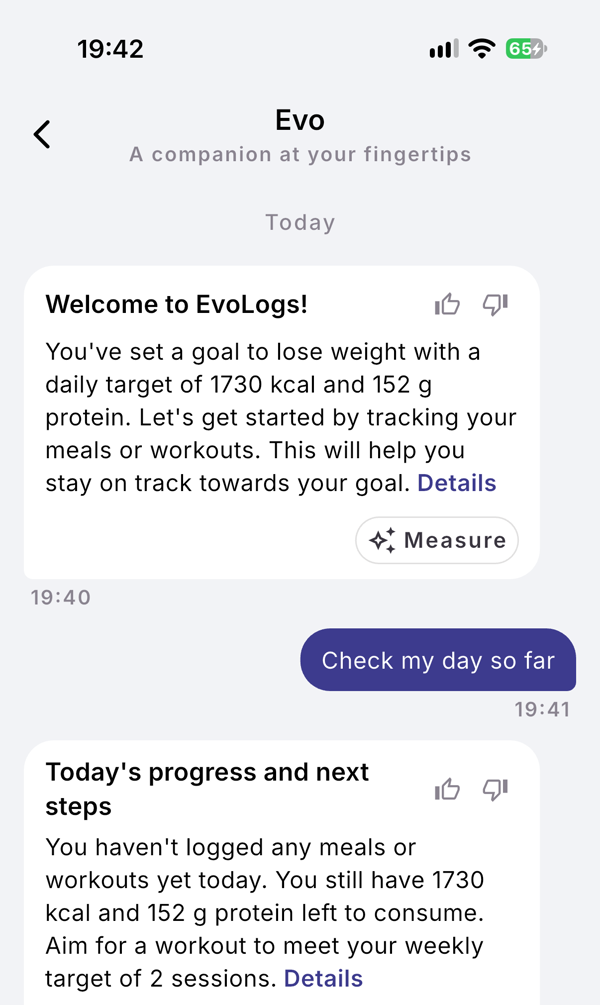
If nothing was logged since the last check, Evo says so instead of inventing an answer: “Nothing new since 13:42.”
Day checks are yours to trigger. Evo never runs one on a schedule. Free accounts get 3 per 30-day cycle, Pro accounts 60.
Asking Evo
Under the card and in the thread there is a text field. Type a question and Evo answers from your own data: today’s meals, this session, this reading, your goal. There are shortcuts on the screens where it matters: “Ask about this meal”, “Ask about this session”, “Ask about this plan”, “Ask about this reading”, and “Ask Evo” on the goals screen.
The first question after onboarding is free on every account. After that, Free accounts have 5 questions per 30-day cycle, and Pro accounts have 300. When a Free account has used them, the field is replaced by a note that says so, and the thread stays readable. Evo’s own messages and day checks are not affected.
What Evo remembers
Evo keeps a short running summary of your conversation, rewritten as it grows, and a list of facts you stated yourself: a constraint, a preference, a plan. When it points something out and you change it, it knows what it said last time. That is what “knows your week” means in practice.
Evo does not know your name or email. It sees your age, gender, height and weight, your goals and targets, and what you log. The full list is in the app under AI & data sharing, with the date you consented and a way to revoke.
What Evo does not do
- It does not run your week. It reads your logs and comments; the decisions are yours.
- It does not send you a message every day unless you turn that on. There is an opt-in daily check-in in the notification settings, off by default.
- It does not treat anything. It is a companion, not a clinician.
- It is not a chatbot about the world. Ask it about the weather and it will bring you back to your data.
Try it
Set a goal, log one meal and one workout. Evo speaks after that, and the first question is on the house.