
Tap the chip under Evo’s message to open the screen it suggests. Nothing changes until you do something there, and Adjust targets always asks you to confirm.
Steps
- Find the chip under Evo’s message, on the Home card or in the thread.
- Tap the chip to open the screen it points to.
- For Adjust targets, compare the current and the proposed numbers.
- Tap Confirm to apply them, or Not now to decline.
- To skip any other suggestion, leave the chip alone.
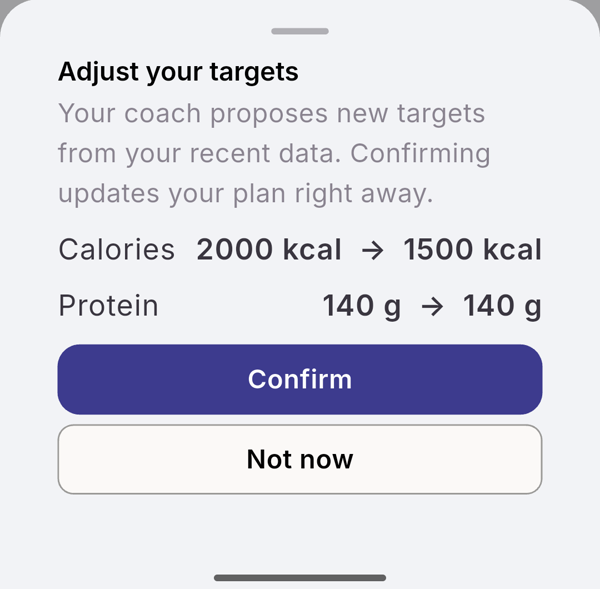
What each chip opens
| Chip | Opens |
|---|---|
| Measure | a new measurement |
| Connect Health | the Health Sync settings |
| Adjust targets | the “Adjust your targets” sheet |
| Set goal, Set weekly workouts | Goals |
| Log this meal | a new meal, with Evo’s description filled in when it gave one |
| Add exercise | the exercise catalog |
| Start plan | the workout planner |
| Follow-up | nothing; it marks a day, up to 28 days ahead, when Evo comes back to this |
What you see
- When the suggestion is done, the chip turns into a green pill with a tick. Measure turns green after you save a measurement, Log this meal after you log a meal within two hours.
- A declined or expired suggestion turns grey.
- Confirm updates your targets right away. Closing the sheet without a choice keeps the chip open.
Limits
Chips are never counted against a limit, on Free or Pro. Only one suggestion is open at a time: a newer one replaces the older. A chip you leave alone expires after 7 days.
Related
- When Evo suggests something: /blog/meet-evo
- /help/evo-card-and-thread
- /help/ask-evo