
On the Nutrition tab, tap add, choose Describe, type the meal in your own words and tap the sparkle button. EvoLogs turns it into ingredients with an estimate, and nothing is saved until you tap Log Meal.
Steps
- Open the Nutrition tab and tap the add button.
- Choose Describe in the sheet.
- Type the meal in the field, for example “200g chicken breast and 150g rice”.
- Or tap Speak instead, say the meal, and tap Use text.
- Tap the sparkle button at the end of the field to send it.
- Check the Meal Preview: the name, the total, and the Based on: list.
- Tap Log Meal.
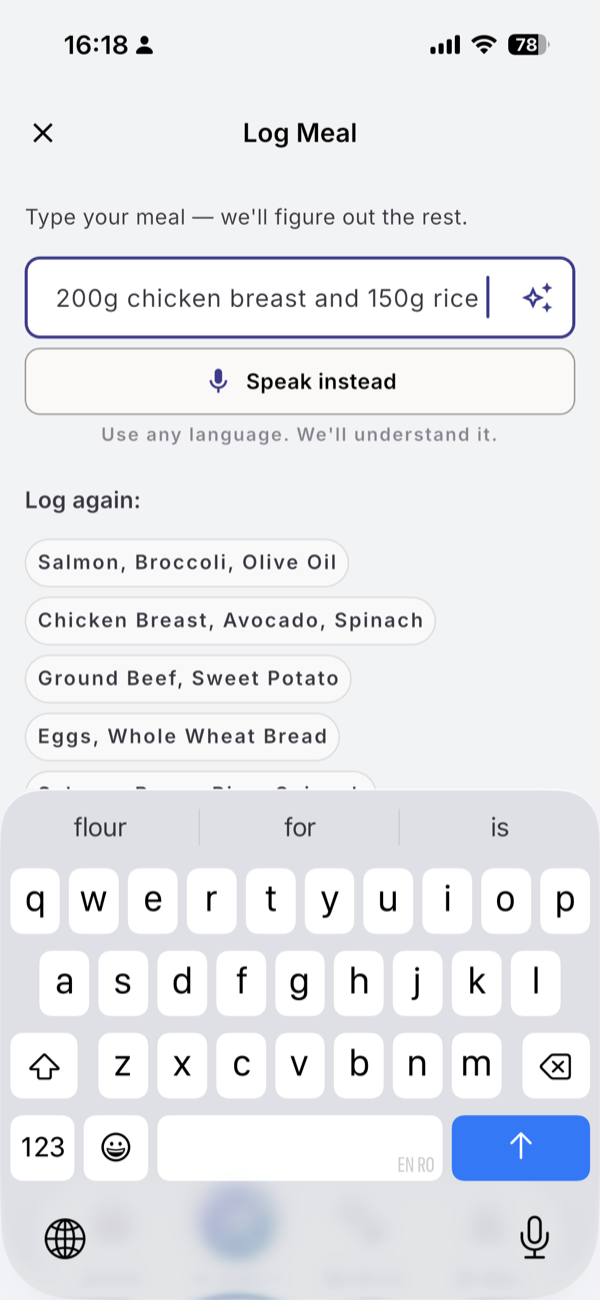
What you see
While it works, the screen shows a status such as “Looking up ingredients…” with “This may take a few seconds”. Portions help but are optional; you can fix them on the Meal Preview. You can type in any language. The Speak sheet listens in English or Romanian.
Below the field, Log again: and From your recipes: log a meal you already have, with no AI.
Limits
| Plan | Text meal analyses per 30-day cycle |
|---|---|
| Free | 15 |
| Pro | 200 |
One meal is one analysis, however many ingredients it has. In your first week the Free number is doubled.
If it does not work
- “AI needs internet. Log manually.” You are offline. Use Log again or a recipe.
- “No ingredients parsed”. Rewrite the meal with one food per item and try again.
- “I’ve been helping you a lot lately.” You used this cycle’s analyses. The sheet shows when they reset.
Related
- Why it works this way: /blog/calorie-tracking-without-a-food-database
- /help/fix-an-estimate-before-saving
- /help/log-a-meal-from-a-photo