
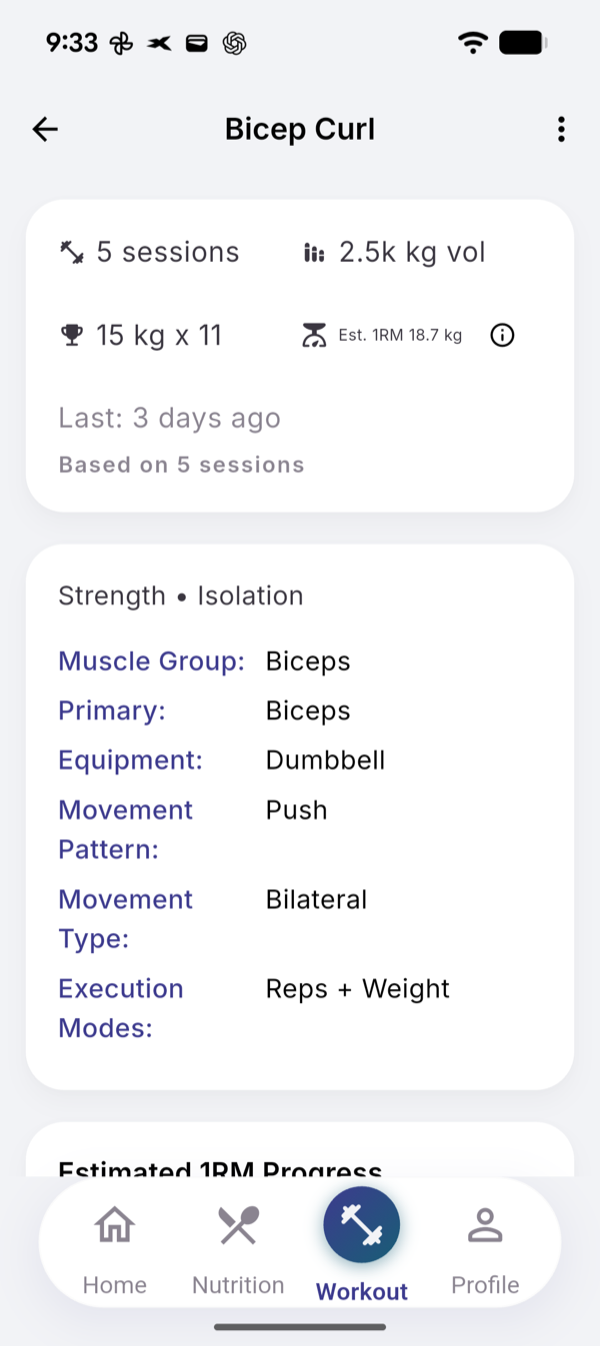
Every exercise has its own page with your sessions, total volume, best set and Est. 1RM, above a progress chart and your session history. Open it from a muscle group on the Workout tab, or from the exercise in your catalog.
Steps
- Tap a muscle group under RECOVERY STATUS on the Workout tab.
- Tap the exercise under Exercises.
- Open Exercise catalog from the Workout menu instead, tap the exercise and tap the info icon (View details).
- Read the four numbers at the top.
- Scroll to Estimated 1RM Progress and tap a point to see its value and date.
- Tap Show all under SESSION HISTORY for older sessions.
What the numbers mean
- Best set: the heaviest weight you lifted, with the most reps at that weight.
- Est. 1RM: an estimate of what you could lift once, weight × (1 + reps / 30). 80 kg × 8 gives 101.3 kg. A single rep counts as its weight.
- Only ticked sets with a weight and 10 reps or fewer feed the estimate. Sets of 11 or more still count for volume.
So the best set and the estimate can come from different sets. The info icon says: “Useful for tracking strength, not exact max weight.”
The chart
One point per session, from that session’s best qualifying set. It needs two points; until then it says how many more sessions it needs. A session with only sets above 10 reps adds no point.
For a bodyweight exercise the chart is Best Reps Progress; for a timed one, Best Time Progress; for distance, Best Distance Progress.
Limits
No AI and no limit, the same on Free and Pro. The page reads your last 100 sessions with the exercise.
Related
- Why it works this way: /blog/estimated-one-rep-max-and-progress
- /help/read-muscle-recovery
- /help/start-a-session