
Open Profile, tap Your Daily Targets, then Adjust manually, type your own numbers and tap Save. The computed targets stay until you change them, and you can keep them as they are.
Steps
- Tap Profile in the bottom bar.
- Under Goals & Lifestyle, tap Your Daily Targets.
- Tap Adjust manually.
- Type Protein, Carbs, Fats, Fiber and Sugar in grams.
- Tap Set calorie goal if you want a calorie number other than the one your macros add up to.
- Tap Save.
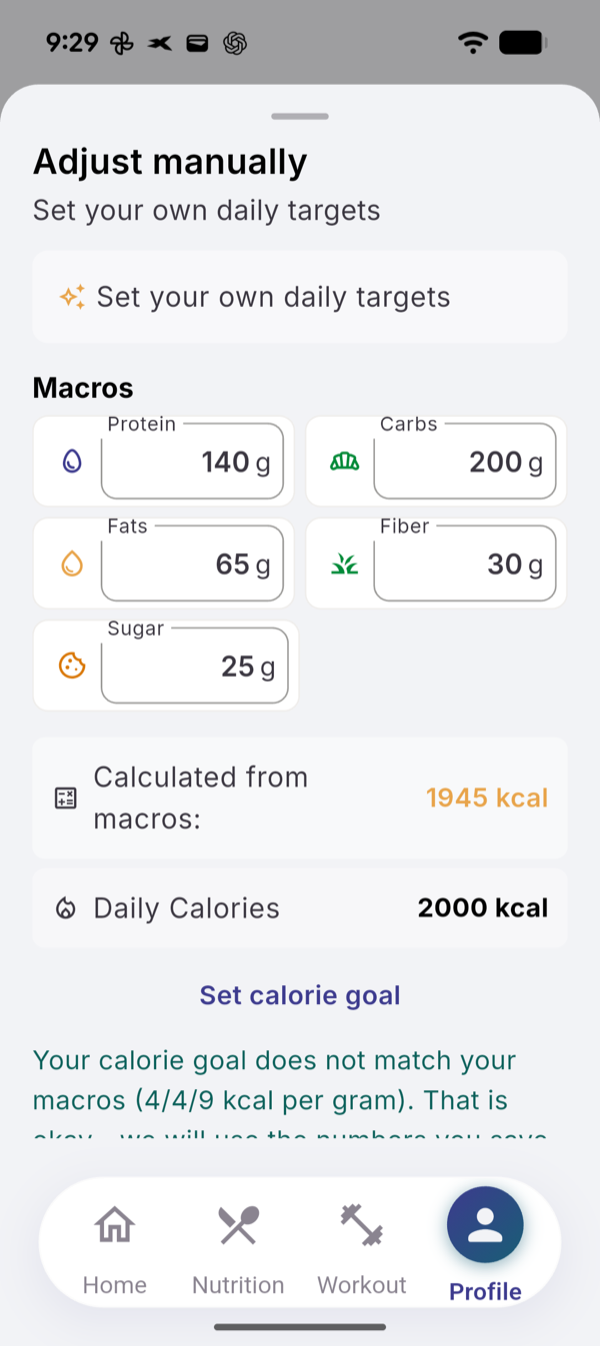
What you see
- How we calculate. Your targets start from your age, gender, height, weight, activity level and goal. The panel under the numbers names the formulas.
- Calories and macros apart. When they do not match, the sheet says so. Recalculate carbs and fats keeps your protein and fits the rest to your calories; Match calories to macros does the reverse.
What changes your targets later
- A profile, goal or lifestyle edit. Changing your weight, height, birth year or gender in Edit Profile (tap your name at the top of Profile), your goal in Goals, or your activity level in Lifestyle recalculates the targets. Calories and macros you typed by hand are replaced. Your own sugar and water targets stay.
- Evo’s Adjust targets action. Evo can propose new calories or protein. Nothing changes until you tap Confirm; Not now leaves your targets as they are.
If it does not work
- Failed to save target: check your connection and tap Save again.
Related
- Why the numbers are what they are: /blog/how-evologs-calculates-your-targets
- /help/units-language-timezone